How Maritime works
The mental model behind every other page in these docs, on one page. Five minutes here saves an hour of guessing later.
Maritime gives your agents the computers they need: Linux sandboxes, Linux and Windows desktops, and Android phones, each its own isolated machine that sleeps when idle and wakes on demand. The machines are described under Compute, starting with Persistent Sandboxes and Linux desktops. This page covers the agent you run on them: what it is, how it sleeps and wakes, how it reaches a model, and what it costs.
The shape of an agent
An agent is a long-lived program running in its own isolated VM (a sandboxed container) with four things attached:
- A persistent volume, mounted at
/datafor most templates. This is the agent's memory: it survives restarts, redeploys, and sleep/wake. Everything outside it is disposable. - Encrypted environment variables: API keys and config, stored encrypted at rest and injected only into that agent's VM. See Env vars & sizing.
- A chat front door. The dashboard chat, the CLI, the REST API, and channels like Telegram all deliver messages down the same path and wait for the agent's reply.
- A framework: the program that actually thinks. Pick a ready-made one (choose a framework) or bring any Docker container.
Sleep and wake
Agents sleep when idle and wake when needed. This is the core economic idea: you can keep hundreds of agents around because a sleeping agent has no compute charge, pays only for its disk, and loses nothing.
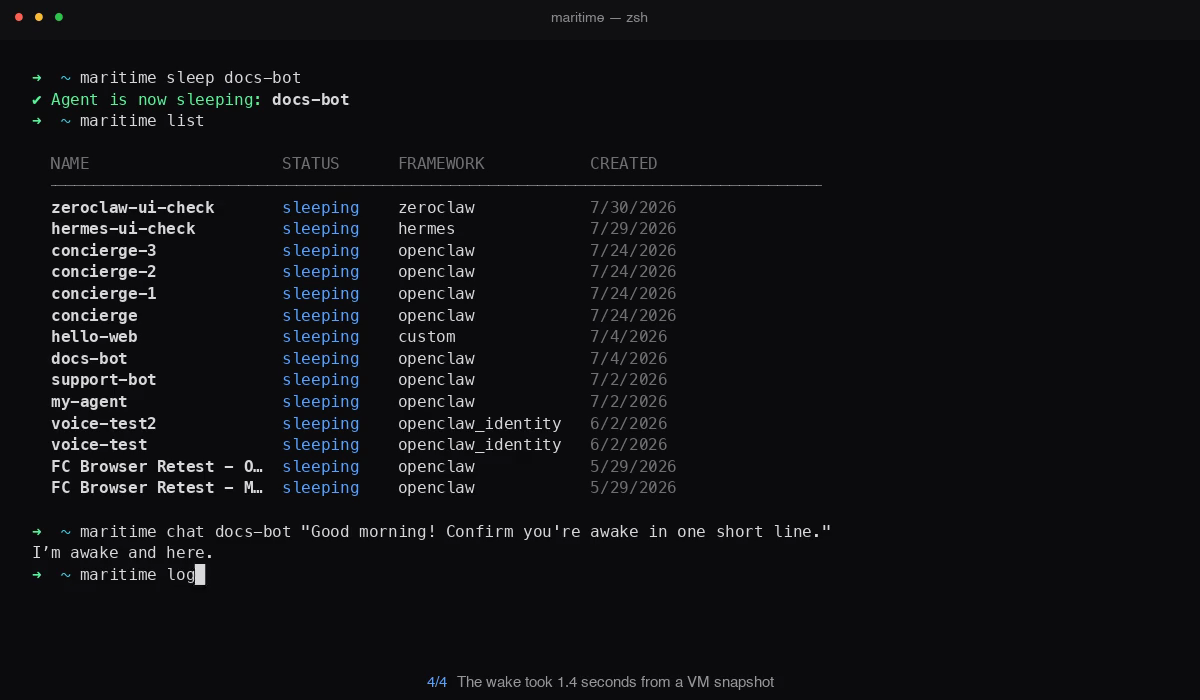
- Falling asleep happens automatically after an idle period. Full state is preserved, including everything on
/data. On micro-VM hosts the process is snapshotted and resumed, not restarted. - Waking up takes about a second and happens on its own when anything needs the agent: a chat message, a channel message, a trigger, a request to a public web URL, or a file/exec API call.
- Sleeping is not unreachability. You never need to wake an agent by hand before talking to it; the platform does it for you and the call waits for the reply.
- Every machine runs on demand. It sleeps when idle and wakes on the next request, with its disk where it left off; you pay per second while it is awake. Machines that never sleep are not sold on the current plans.
One consequence worth internalizing: timers inside a sleeping agent do not fire. Scheduled work belongs in a platform trigger, not an in-process scheduler. That is what Triggers & schedules is for.
Projects and the front door
Every agent lives in a project (its projectId is on the agent object). Channels attach at the project level: point a Telegram bot at a project and it becomes the front door for the agent inside it. With the project's newChatPolicy set to spawn, each new person who messages the bot gets their own agent instance, which is the same mechanism the SDK uses to give every customer of your product their own agent.
How agents reach a model
Hosting and model calls are separate. For LLM access there are two paths:
- No key: the Maritime LLM proxy. Agents created without a key get a per-agent token for Maritime's OpenAI-format proxy. Their model calls are paid from prepaid AI credits at the provider's list price, separate from your plan. OpenClaw, Hermes, ZeroClaw, and DeepSeek Harness all work through the proxy with no key of their own.
- Your own key: direct. Set
OPENAI_API_KEY(or the provider's equivalent) as a secret env var and the agent talks to the provider directly; Maritime does not bill those calls. Claude Code is the one template that requires this: it speaks the Anthropic API, which the proxy does not, so it needs yourANTHROPIC_API_KEY.
What it costs
One subscription covers every machine. Your monthly plan fee (Starter $20, Growth $100, Scale $500, Dedicated $5,000, or Enterprise) becomes usage credit. Machines are billed per second at their hourly rates while awake, and for their disk while asleep. Usage past the credit is billed on the same invoice. New accounts start with a 7-day free trial with up to $20 of usage. Model calls through the proxy are paid separately, from prepaid AI credits. Full tables in Billing & plans.
Four ways to drive it
- Dashboard: create, chat, configure, watch logs, no terminal needed.
- CLI: everything the dashboard does, scriptable. See the CLI reference, or hand it to an AI agent.
- REST API: the same operations over HTTP. See the REST API.
- SDK: TypeScript and Python clients built for provisioning one agent per customer from your own backend. See Build on Maritime.
Next
Deploy your first agent in the quickstart, pick a template on Choose a framework, or wrap your own code with Deploy any container.